
Profile
Customize how your online farm stand looks to customers
Profile details are public and will be visible to customers.
You can see an example of how a farm profile appears on the storefront here: Storefront > Farm profile.
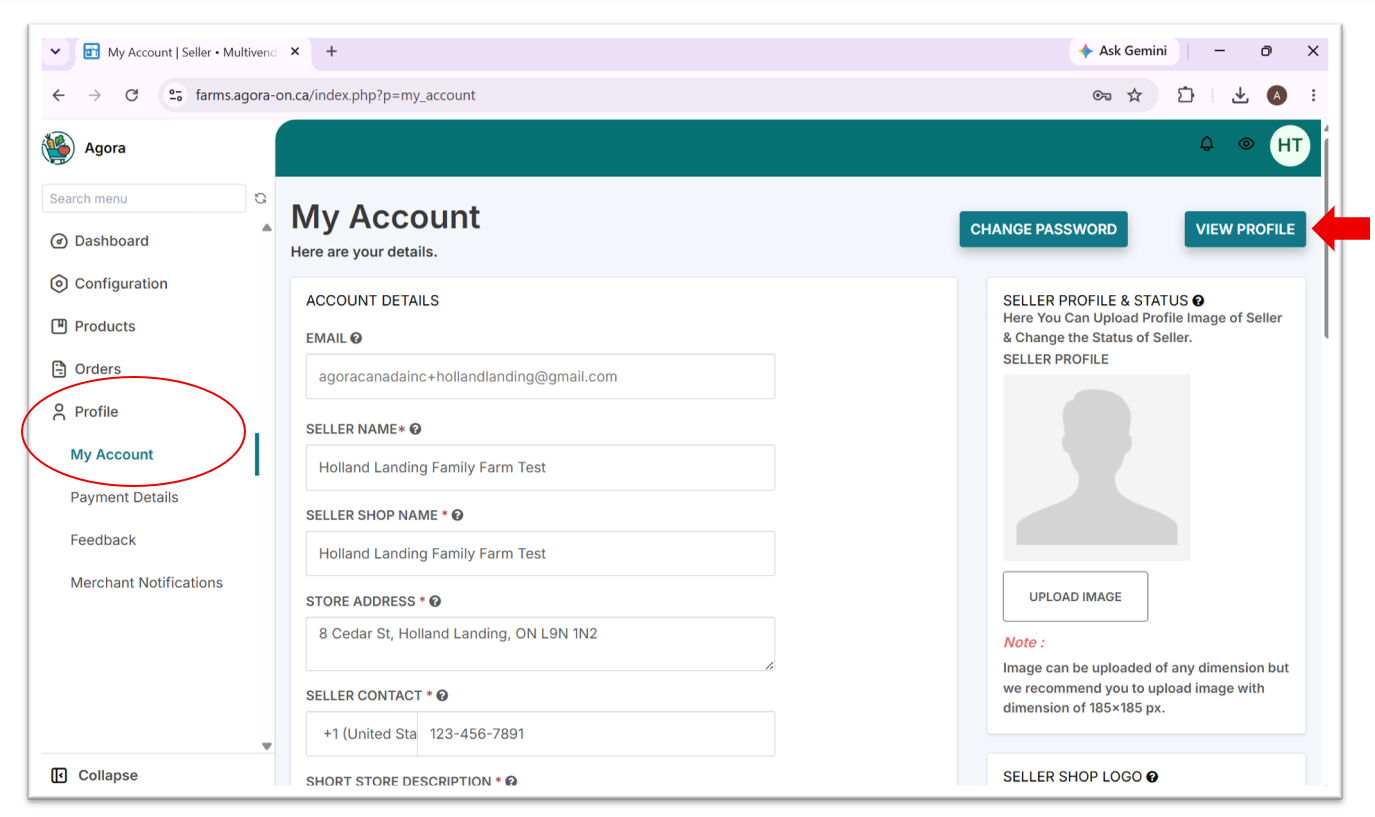
- In the admin portal, navigate to
Profile > My Account - Fill in the required fields
SELLER NAMEandSELLER SHOP NAME- farm nameSTORE ADDRESS- address for customer pickupSELLER CONTACT- phone number for customer callsSHORT STORE DESCRIPTION- friendly intro to your farmDETAILED STORE DESCRIPTION- any additional information you'd like customers to know (this will show up under theExtrastab on your farm's profile page)HOURS- the hours during which customers can pick up their orders
- Add your farm's logo under
SELLER SHOP LOGO - Click
SAVE CHANGESto save profile details and logo - Click
VIEW PROFILEto see how your farm stand looks on the live storefront
SELLER PROFILE & STATUSandSTORE BANNER IMAGEare not being used at the moment.
Updated 4 months ago
Did this page help you?